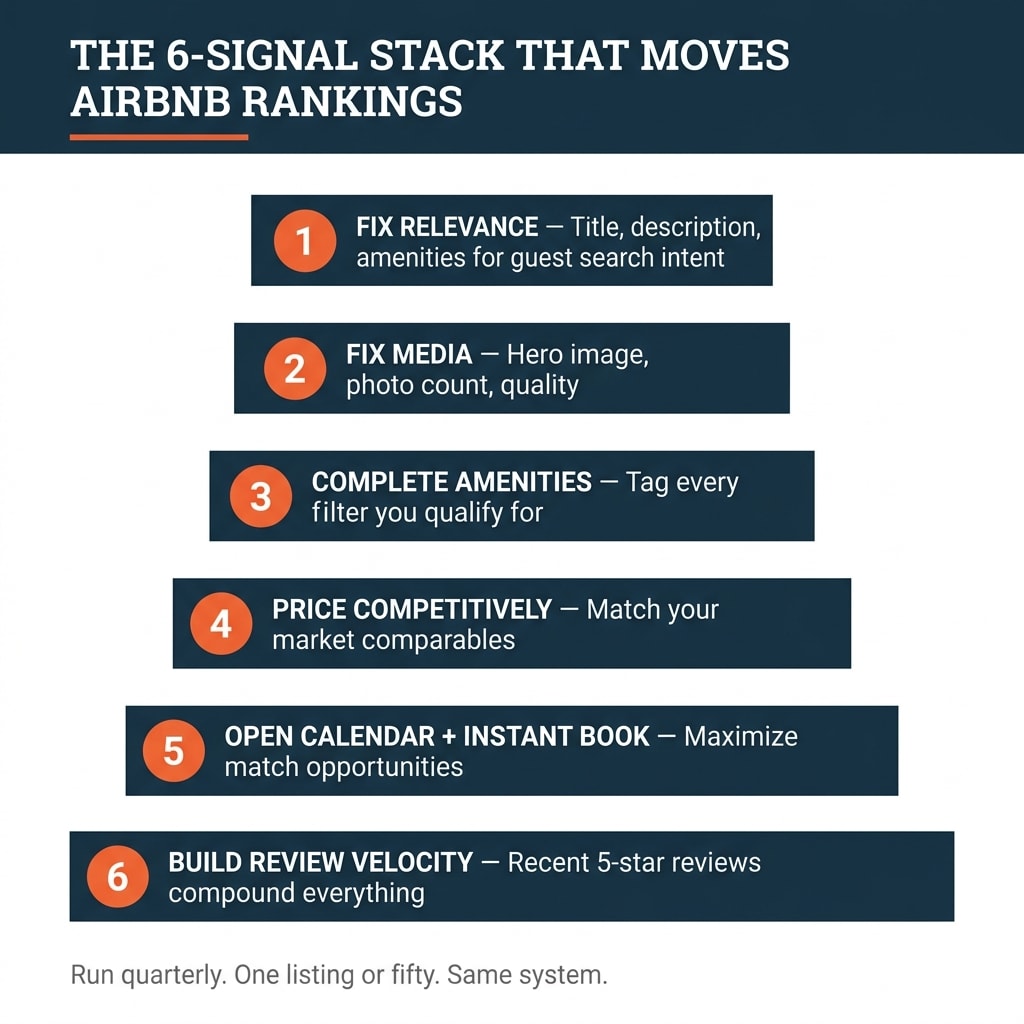
Airbnb decides which listings a guest sees using four documented factors — quality, popularity, price, and location — filtered by the exact search criteria that guest typed. So listing optimization is not a keyword trick. It is conversion work in a fixed order: make the listing match how guests search, tag every real amenity so filters can find you, make the photos earn the click, price inside the comparable set, then keep response and review behavior clean. Do it in that order and you can measure the result in views, saves, and booked nights.
Last updated: 2026-09-18
I have spent more than 18 years in real estate, focused on short-term rentals since 2016, and I have trained over 10,000 operators through CashFlow Diary. When someone hands me a stalled listing, I check one thing before anything else: was this written for the host or for the guest? Those are two different documents, and the second one is the one that books. This article is educational and is not tax or legal advice — ask your own CPA and attorney about anything touching taxes or your lease.
What Airbnb's search actually rewards
Airbnb publishes the shape of its ranking system in its own help documentation: quality, popularity, price, and location, re-ranked for every search and personalized to each guest based on their criteria, filters, and past activity. Two guests typing the same city and the same dates do not see the same list. The algorithm is proprietary, it changes, and no host, coach, or software vendor controls it.
What you control is narrower and more useful: the signals you send, and whether they match real guest demand.
Ranking factor | What Airbnb looks at | What you change this week |
|---|
Quality | Review scores, photo standards, listing completeness | Fill every empty field, replace weak photos, fix the hero shot |
Popularity | Bookings, saves, click-through on your card in search | Improve the hero image and title so the card gets clicked |
Price | How your nightly rate sits against comparable listings | Reprice against your true comp set, not your target income |
Location and match | Proximity to where the guest wants to be, plus filter and criteria matching | Tag every amenity you have and write the description in guest language |
Two things follow from that table. You can move quality and match quickly, because they are mostly data entry and photography. You cannot move location, so stop arguing with it and start describing it accurately — walk time to the venue, the district name a guest would search, the airport you are near.
Write the listing in the words guests search
Hosts describe what they are proud of. Guests search for what they need. Those vocabularies rarely overlap.
Filters are the hard gate. When a guest filters for pet-friendly, Airbnb shows listings with that amenity checked. If you allow pets and never checked the box, you do not rank low for that search — you are absent from it. Same for workspace, hot tub, EV charger, self check-in, crib, free parking. Every untagged amenity is a set of searches you never appear in, and no amount of description copy fixes it.
Run this in one sitting:
Write down the three guest types most likely to book your unit — business traveler, relocating family, couple, remote worker, event attendee.
For each type, write three to five phrases they would actually type or filter for. Their words, not yours.
Open your amenity list and check every feature you truly have, one by one, including the boring ones.
Read your title and description against the phrase list and mark every gap.
Rewrite the gaps into the title, the description sections, and the amenity tags.
Never tag an amenity you do not have. Guests filter on your claim, arrive, and write the review that follows. That review damage lasts far longer than any short visibility gain, and repeated misrepresentation puts the listing itself at risk.
Title and description: earn the click, then answer the questions
Your title's job is the click. Your description's job is converting that click into a booking and preventing the pre-booking message thread.
The standard I hold operators to on titles: keep them short, lead with one standout feature, skip symbols, emoji, and ALL CAPS, and do not repeat what the search card already shows next to your title — city, bed count, "entire home."
Weak: Cozy 2BR Apartment in Nashville. Airbnb already shows the city and the bedroom count, and "cozy" says nothing.
Stronger: Fiber WiFi | 8-min walk to Broadway | Quiet king suite. Three concrete reasons to click, aimed at a remote worker or a light sleeper.
For the description, structure it in the sections Airbnb gives you — the space, guest access, the neighborhood, other things to note — and use it to answer the five questions guests ask you most. Every question you answer in the description is a message you do not have to reply to, which protects your response metrics. Be accurate rather than flattering. Guests who get exactly what was promised leave five-star reviews; oversold guests leave paragraphs.
Specifics beat adjectives every time. "Fast internet" is noise. "500 Mbps fiber, dedicated desk with a 27-inch monitor, four-minute walk to the convention center" is a booking decision.
Photos and amenities: the two highest-yield afternoons
The hero image decides click-through from the search grid, and click-through feeds the popularity signal. Make it your single strongest shot — the view, the pool, the room that looks like nowhere else in your comp set — shot in daylight, horizontal, uncluttered.
Then cover the whole property. Airbnb's own guidance is that high-quality photos and a complete description improve engagement and ranking. My working standard is 15 to 30 photos: every bedroom, every bathroom, the kitchen, the workspace, the parking, the entry, and the outdoor space. Missing rooms read as something hidden. Caption the ones a guest would question — the sofa bed, the stairs, the shared driveway.
Fix | Time to complete | Signal it moves | How you verify it worked |
|---|
Replace the hero image | One shoot plus an hour | Click-through, saves | Views and saves in your listing insights over 14 days |
Add missing rooms to the photo set | One shoot | Quality, completeness | Fewer pre-booking questions, higher accuracy scores |
Check every real amenity tag | 30 minutes | Filter match | New inquiries from filters you previously missed |
Rewrite title around one standout feature | 20 minutes | Click-through | Views per day before versus after |
Answer the top five guest questions in the description | One hour | Response metrics, accuracy reviews | Message volume per booking drops |
Reprice against the real comp set | Two hours | Price competitiveness | Booked nights per month at equal or better rate |
Notice what is not on that list: nothing costs more than a weekend, and nothing depends on a vendor. Operators skip this work because it is unglamorous, then buy tools to compensate for it.
Price, response, and availability are ranking behavior
Price is judged in context. Airbnb compares your rate against listings a guest would consider instead of yours, so build the comp set strictly: same guest capacity, same neighborhood or walk-time band, same bedroom count, similar amenity tier. If your rate sits above that set with a weaker photo set, you get views and no bookings — and thin conversion is itself a negative signal.
A few pricing rules I hold to:
Set demand-based pricing with floors and ceilings you can defend, and check the floor monthly. An automated tool with no floor will discount you into a bad guest mix.
Price the ramp, not the goal. A brand-new listing with no reviews prices below the comp set for its first bookings, then climbs.
Do not fix a conversion problem with a discount. Fix the photos and the description first; a discount only sells a listing that already looks worth booking.
Booking fees change the arithmetic, so pull the current host service fee from Airbnb's own fee documentation before you set your floor rather than trusting a number you read in a forum. Fees and their structure change; your model should read from the source.
Response behavior and calendar health are the parts hosts most often forget. Answer inquiries fast and consistently. Keep the calendar truly open for the dates you want to sell — a calendar blocked most of the month cannot be surfaced for most searches. And treat Instant Book as a commitment, not a growth hack: Airbnb states that for listings that are not instantly bookable the algorithm weighs response speed and rejected requests, so instantly bookable listings can rank higher because the booking confirms without host action, but host-initiated cancellations carry real penalties. Only turn it on if you will honor what it books.
The five-step optimization process, run quarterly
This is the order I use. The sequence matters, because fixing price before fixing match just discounts a listing nobody can find.
Match. Rewrite the title, description sections, and amenity tags against your three guest types and their search phrases. Record the date and your current 30-day views.
Quality. Replace the hero image, complete the photo set, fill every empty listing field, and caption anything a guest would ask about.
Price. Rebuild the comp set from scratch — markets shift — then set your floors and ceilings and check them against the last 90 days of your own booked rates.
Behavior. Audit response time, open availability for the next 90 days, minimum-stay settings, and whether Instant Book is on and honored.
Reviews. Ask for reviews on the stays that went well, and read the last ten reviews for the same complaint appearing twice. A repeated complaint is a property problem, not a listing problem.
Then measure. Views, saves, inquiries, and booked nights, compared to the same 30-day window last year rather than last month, because seasonality will otherwise take credit for your work. Give each round two to four weeks before you judge it. Change five things at once and you will never know which one paid.
Build this as a written checklist once and it becomes delegable: a cohost or assistant can run steps one through four with your standards attached. You own the standard; you do not have to own the clicking.
If you want a second set of eyes on your listing, your comp set, and the market you are in, book a complimentary one-on-one diagnostic call and bring your listing insights with you.
What backfires, and what you cannot control
Four failure modes account for most of the wasted effort I see.
Keyword-stuffed titles. Filters, not title wording, are what put you in a filtered result set. A title reading like a tag list reads as spam to the human deciding between six cards, so you lose the click you were optimizing for.
Claiming amenities you do not have. Covered above, and worth repeating because it is the most expensive mistake on this page.
Signals you cannot sustain. Instant Book plus selective cancellations is worse than never enabling it. Same with a minimum-stay setting you keep overriding, or a discount tier you quietly stop honoring.
Optimizing for the algorithm instead of the stay. The system exists to surface listings that produce five-star stays. A listing that gets clicks and bad reviews gets corrected downward. The most reliable search work is an accurate listing for a property that delivers.
What you cannot control: the algorithm's internals, its changes, its personalization to each guest, and your competitors. If five better-photographed units open in your market next quarter, your relative position moves even if you did nothing wrong. That is why this is a quarterly routine and not a one-time project.
This is operator education, not a promise of search placement or income. Results vary by market, property, and execution.
Related reading
Keep reading:
Frequently Asked Questions
How does Airbnb decide which listings to show in search?
Airbnb's help documentation describes four factors: quality, popularity, price, and location, matched against each guest's specific search criteria and filters. The ranking recalculates continuously and is personalized, so the same listing sits in different positions for different searchers. No host or third-party tool controls placement.
How do I optimize my Airbnb listing for search?
Work in order. Fix match first — title, description, and amenity tags written in the words your target guests search and filter for. Then quality: hero image, a complete 15-to-30-photo set, and no empty listing fields. Then price against a real comp set. Then response speed, open availability, and review velocity. Re-run the sequence quarterly and measure views, saves, and booked nights against the same window last year.
Do keywords in my Airbnb title help my ranking?
Amenity tags and listing characteristics are what power the filters guests use, so those matter more than clever wording. Your title's job is to win the click once you appear: lead with one standout feature, skip symbols and ALL CAPS, and do not repeat the city or bed count that Airbnb already displays. Stuffed titles hurt both the click and your credibility.
How many photos and amenities should a listing have?
Plan on one strong hero image plus a complete set — my standard is 15 to 30 photos covering every space a guest will use, including bathrooms, workspace, parking, and entry. Tag every amenity you actually have, because untagged features make you invisible in filtered searches. Never tag one you do not have — the review that follows costs more than the visibility.
Does Instant Book improve search visibility?
Instantly bookable listings can gain visibility because a guest can confirm without waiting for host approval. The catch is enforcement: host-initiated cancellations carry penalties, so enable it only for the dates and rules you will honor. If you find yourself cancelling bookings you did not want, tighten your house rules and requirements instead of turning the feature into a gamble.
Sources